Part of The Complete Resume Guide for 2026. This post is one chapter in the pillar guide that covers format, ATS, keywords, tailoring, and role-specific examples end-to-end.
Your finger is hovering over Submit and you are second-guessing everything.
Did you catch all the typos? Are your keywords right? Does it look professional? Will it pass the ATS? Is there something obvious you are missing?
This is the moment where most people either send it anyway (hoping for the best) or spiral into another hour of tweaking. Neither approach is great. What you need is a checklist.
Run through these 10 items before every application. If you can check them all off, hit submit with confidence.
Quick Answer: What should be on a resume in 2026? A 1-page document (or 2 pages if you have 8+ years of experience) with a title-aligned 3-line summary, an exact-keyword skills section, quantified bullets in reverse-chronological order, education at the bottom, and a single-column ATS-safe format — all tailored to the specific job you're applying for. The full 10-point checklist below covers every item recruiters and ATS systems actually look for.
The "Why": Why a checklist matters
You are juggling formatting, keywords, tailoring, and different versions without a system. You cannot hold all of it in your head. One small error, like a typo in your email address or a broken link, can kill an otherwise strong application.
A checklist catches what tired eyes miss.
The 2026 resume checklist
1. Format is clean and ATS-safe
Before anything else, make sure your resume will actually be read correctly.
Check for:
- Single-column layout (no tables, text boxes, or multi-column designs)
- Simple bullet points (•) not fancy symbols
- Standard section headers (Experience, Education, Skills)
- Consistent font throughout (Calibri, Arial, or similar)
- Margins between 0.5 and 1 inch
- No headers or footers containing critical info
Deep dive: Why Your DIY Resume Margins Are Killing Your Chances
2. Keywords match the job description
Your resume needs to speak the same language as the job posting.
Check for:
- 5-10 key terms from the job description appear in your resume
- Exact phrases used (not paraphrased versions)
- Keywords appear naturally in bullets, not stuffed into a list
- Both acronyms and full terms included where relevant (e.g., "SEO" and "Search Engine Optimization")
Deep dive: The "Cheat Codes" of Hiring: 50 Keywords Every Resume Needs
3. Resume is tailored to this exact role
A generic resume gets generic results.
Check for:
- Summary mentions the target role or relevant keywords
- Top 3-5 bullets align with the job's main requirements
- Skills section reflects what this job asks for
- Irrelevant experience is minimized or removed
Deep dive: Stop Sending Generic Resumes: How to Tailor in 5 Minutes
4. ATS compatibility is verified
The best resume in the world is useless if the ATS scrambles it.
Check for:
- Resume copied to plain text looks correct and in order
- No images, graphics, or icons in the body
- Contact info is in the main body, not a header or footer
- File is under 2MB
- Run a free ATS scan to verify your score before submitting
Deep dive: Is Your Resume Invisible? How to Beat the ATS Robots
5. Achievements are quantified with data
Numbers make your bullets believable and memorable.
Check for:
- At least half of your bullets include a metric (%, $, #, time)
- Numbers have context (50% of what? $1M out of how much?)
- Claims are accurate and defensible in an interview
- Action verbs lead each bullet (Led, Built, Increased, not "Responsible for")
Deep dive: Turning Duties into Data: How to Quantify Your Achievements
6. Early-career sections prove real skills
No experience does not mean no proof.
Check for:
- Projects, coursework, or volunteer work are included (if limited work history)
- Skills section is specific, not generic ("Python, SQL, Tableau" not "computer skills")
- Each bullet shows an outcome, not just a task
Deep dive: No Experience? No Problem. How to Write a Student Resume
7. AI edits are ethical and accurate
If you used AI to help write your resume, make sure it is still yours.
Check for:
- All claims are true and you can discuss them in an interview
- Language sounds like you, not like a press release
- No buzzword overload ("synergize," "leverage," "spearhead" everywhere)
- You reviewed and edited every AI suggestion
Deep dive: Will Using AI on My Resume Get Me Banned? The Truth
8. Employment gaps are framed clearly
Gaps are fine. Unexplained gaps are suspicious.
Check for:
- Gaps over 6 months are briefly addressed
- Career break entries show what you did (certifications, projects, caregiving)
- Dates are accurate and consistent with your LinkedIn
- Tone is confident, not apologetic
Deep dive: Laid Off or Took a Break? How to Frame Career Gaps
9. LinkedIn is aligned with your resume
Recruiters will check. Make sure they find consistency.
Check for:
- Job titles match between resume and LinkedIn
- Date ranges match
- Major achievements appear in both places
- LinkedIn headline reflects your target role
Deep dive: Your Resume is Only Half the Battle: LinkedIn Optimization
10. Final file is export-ready
The last-mile details that trip people up.
Check for:
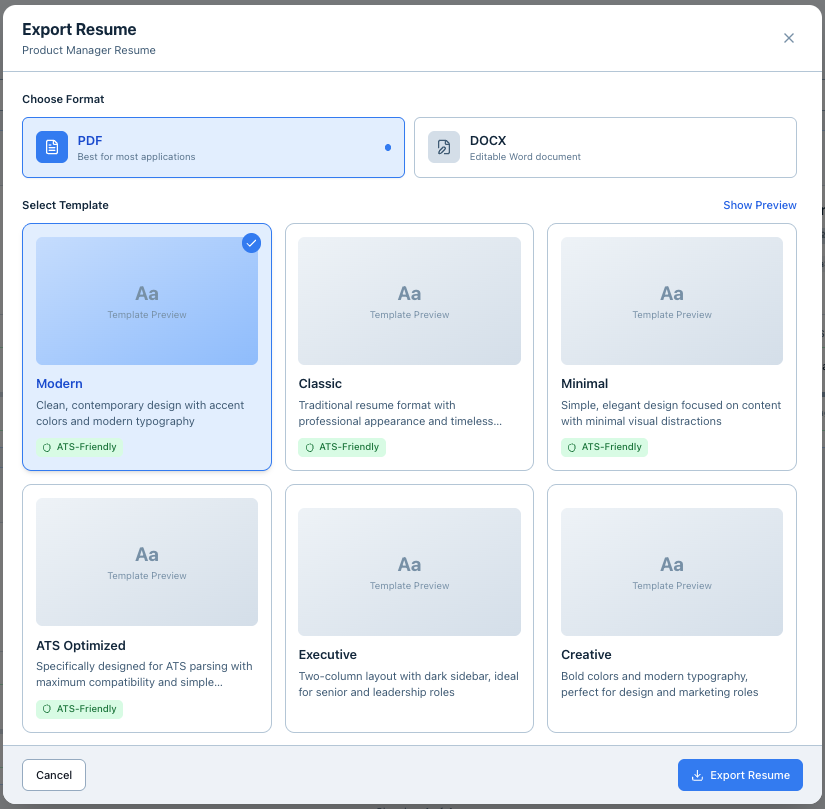
- Saved as PDF (unless .docx specifically requested)
- File named clearly: FirstName_LastName_Resume.pdf
- File size under 2MB
- Opened on another device to confirm formatting holds
- No track changes or comments visible
- Contact info is correct (email, phone, LinkedIn URL all work)
The quick pre-submit scan
If you only have 2 minutes, check these 5 things:
- Contact info correct? Open your email link. Does your phone number have all the digits?
- Tailored to this job? Does your summary or top bullets mention something specific to this role?
- No typos in the first 3 lines? This is where recruiters look first.
- PDF opens correctly? Open the file you are about to submit, not your working version.
- File named correctly? FirstName_LastName_Resume.pdf, not "resume final v3.pdf"
What NOT to do
- Do not submit without reading it one more time. Fresh eyes catch errors.
- Do not assume spellcheck caught everything. It misses context errors ("manger" vs. "manager").
- Do not skip the plain text test. Copy your PDF into Notepad or TextEdit and check the order.
- Do not send at 2am. Typos happen when you are tired. Send when you are alert.
- Do not use a generic file name. "Resume.pdf" signals you did not customize anything.
FAQ
Q: How long should this final check take? A: 5-10 minutes if your resume is already in good shape. Do not rush it, but do not turn it into another editing session.
Q: Should I have someone else review it? A: If you have time, yes. A second set of eyes catches things you are blind to. But do not let that delay you indefinitely.
Q: What if I find a mistake after I already submitted? A: If it is minor (a typo), let it go. If it is major (wrong company name, broken email), some application systems let you resubmit. Otherwise, move on and fix it for the next one.
Q: Do I need to do this for every single application? A: The tailoring and keyword checks should happen every time. The formatting and contact info checks can be quicker once you know your base resume is solid.
Q: Can JobVouch do this check for me? A: JobVouch handles ATS scoring, keyword matching, and formatting checks automatically. This checklist covers the human judgment parts that still need your attention.
Related Tools
- Free ATS Resume Checker — Run your pre-submit ATS scan in 30 seconds, no signup required
- AI Resume Tailor — Tailor your resume to the exact job description before you hit submit
Related posts
- Why Your DIY Resume Margins Are Killing Your Chances
- Is Your Resume Invisible? How to Beat the ATS Robots
- Stop Sending Generic Resumes: How to Tailor in 5 Minutes
- How to Turn Any Job Description Into Resume Bullets
- What Is an ATS Score? How ATS Systems Score Your Resume
Run your final check in seconds
You have put in the work. Do not let a small mistake cost you the interview. Check your ATS score free, then tailor your resume to highlight missing keywords before you export. Get your resume ready for the job interview with a clean preview and instant analysis.